> For the complete documentation index, see [llms.txt](https://developer.siteminder.com/llms.txt). Markdown versions of documentation pages are available by appending `.md` to page URLs; this page is available as [Markdown](https://developer.siteminder.com/channels-plus-api/guides/api-overview.md).
# API Overview
Use this page to understand what each Channels Plus API component does and what data it handles.
There are two ways to discover properties on Channels Plus before making a reservation:
* **Channel API** — search for live availability in real time using the Properties and Property endpoints.
* **Export API** — pre-load a local catalog of property content and room rates, then use the Channel API to confirm live pricing before booking.
## Reservation Journey
### **Channel API**
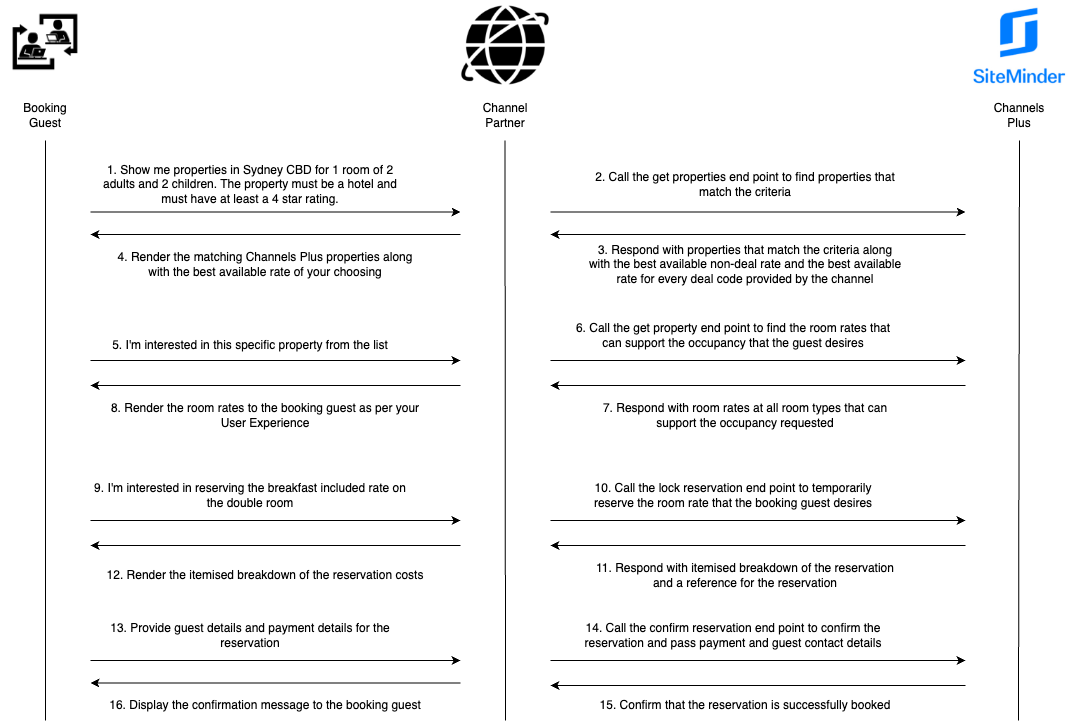
Use the Channel API to search for live availability and current pricing in real time. This is the standard reservation flow.
{% stepper %}
{% step %}
#### Get properties
Call the get properties endpoint to retrieve the available inventory on Channels Plus that matches your booking guest's criteria.
{% endstep %}
{% step %}
#### Get property
Call the get property endpoint to retrieve the room rates for a specific property that your booking guest is interested in.
{% endstep %}
{% step %}
#### Lock reservation
Call the lock reservation endpoint once your booking guest has reviewed the room rates and would like to reserve the selected room rate.
{% endstep %}
{% step %}
#### Confirm reservation
Call the confirm reservation endpoint after your booking guest has provided all necessary details (e.g., payment information) to complete the booking.
{% endstep %}
{% endstepper %}
### Export API
The Export API is an alternative to the Channels Plus Channel API for property discovery. It does **not** replace the Channel API for the purposes of making a reservation — both APIs are required in the reservation flow.
{% stepper %}
{% step %}
#### Export Properties
Call Export Properties to retrieve the list of properties available to you on Channels Plus.
{% endstep %}
{% step %}
#### Export Property
Call Export Property for each property to retrieve static content and the list of available room rates.
{% endstep %}
{% step %}
#### Get Property
Call Get Property on the Channel API to retrieve live availability and current pricing for room rates matching your guest's stay criteria.
{% endstep %}
{% step %}
#### Lock a Reservation
Call the lock reservation endpoint once your booking guest has reviewed the room rates and would like to reserve the selected room rate.
{% endstep %}
{% step %}
#### Confirm a Reservation
Call the confirm reservation endpoint after your booking guest has provided all necessary details (e.g., payment information) to complete the booking.
{% endstep %}
{% endstepper %}
***
## Endpoints
### **Channel API**
{% columns %}
{% column %}
#### Properties
`REST/JSON`
Returns an array of shoppable properties on Channels Plus that match the specified search criteria. This endpoint also provides property content, along with the best available deal and non-deal room rate for each property.
* [Properties](/channels-plus-api/reference/property.md)
{% endcolumn %}
{% column %}
#### Property
`REST/JSON`
Returns content and available room rates for a specific property that meets the requested occupancy combination.
* [Property](/channels-plus-api/reference/property.md)
{% endcolumn %}
{% endcolumns %}
***
{% columns %}
{% column %}
#### Lock Reservation
`REST/JSON`
Temporarily locks one or more room rates at a specific property for a limited period.
* [Lock Reservation](/channels-plus-api/reference/lock-reservation.md)
{% endcolumn %}
{% column %}
#### Confirm Reservation
`REST/JSON`
Confirms a locked reservation that is still within the lock period.
* [Confirm Reservation](/channels-plus-api/reference/confirm-reservation.md)
{% endcolumn %}
{% endcolumns %}
***
{% columns %}
{% column %}
#### Modify Reservation
`REST/JSON`
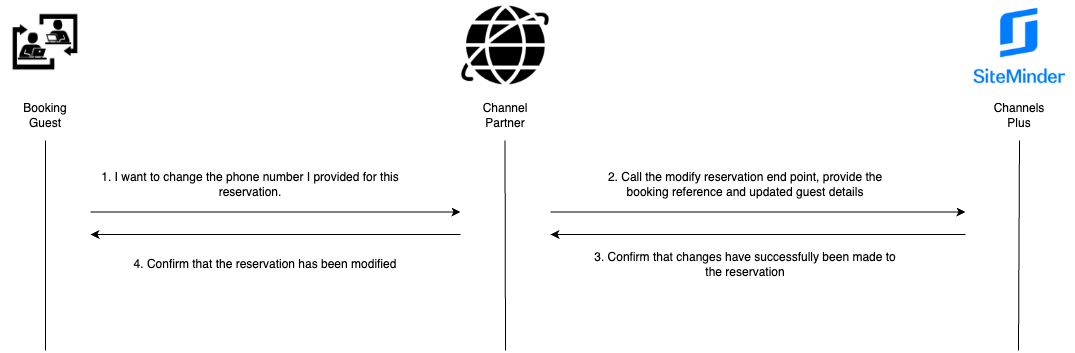
Updates guest details and remarks for an existing reservation. Changes that affect pricing cannot be modified. If pricing-related details need to be updated, the reservation must be canceled and rebooked following the same reservation flow.
* [Modify Reservation](/channels-plus-api/reference/modify-reservation.md)
{% endcolumn %}
{% column %}
#### Cancel Reservation
`REST/JSON`
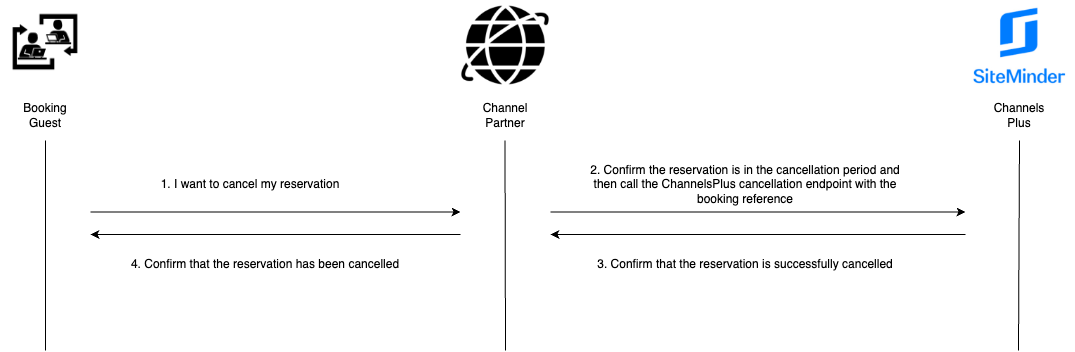
Cancel a reservation that is still within the cancellation period.
* [Cancel Reservation](/channels-plus-api/reference/cancel-reservation.md)
{% endcolumn %}
{% endcolumns %}
***
{% columns %}
{% column %}
#### Reservations List
`REST/JSON`
Retrieves a list of reservations based on the specified dateType (bookedOn, checkIn, or checkOut) and a date range (fromDate to toDate) of no more than 31 days.
* [Reservations List](/channels-plus-api/reference/reservations-list.md)
{% endcolumn %}
{% column %}
#### Reservation Detail
`REST/JSON`
Retrieves detailed information for a specific reservation created via the API.
* [Reservation Detail](#reservation-detail)
{% endcolumn %}
{% endcolumns %}
### **Export API**
{% columns %}
{% column %}
#### Properties
`REST/JSON`
Returns a paginated list of property IDs on Channels Plus that you have access to.
* [Export Properties](/channels-plus-api/reference/export/properties.md)
{% endcolumn %}
{% column %}
#### Property
`REST/JSON`
Returns all static content and room rates for a specific property.
* [Export Property](/channels-plus-api/reference/export/property.md)
{% endcolumn %}
{% endcolumns %}
***
## **Flow Examples**
### **Make a Reservation**
### **Modify Guest Details**
### **Cancel a Reservation**
{% hint style="success" icon="sparkles" %}
## Still have questions?
Use the :gitbook-assistant: **Ask** button at the top of the page to chat with our AI assistant — it can help you navigate the guide, understand requirements, and troubleshoot issues.
If you need more support, visit [Integration Support](/integration-support/integration-support.md).
{% endhint %}
---
# Agent Instructions
This documentation is published with GitBook. GitBook is the documentation platform designed so that both humans and AI agents can read, navigate, and reason over technical content effectively. Learn more at gitbook.com.
## Querying This Documentation
If you need additional information that is not directly available in this page, you can query the documentation by asking a question.
Perform an HTTP GET request on the following URL with the `ask` and `goal` query parameters:
```
GET https://developer.siteminder.com/channels-plus-api/guides/api-overview.md?ask=&goal=
```
`ask` is the immediate question: it should be specific, self-contained, and written in natural language.
`goal` is what the user is ultimately trying to achieve, the reason they need the answer. Sharing it helps GitBook give you a better, more relevant answer. A goal is most helpful when it describes the outcome the user wants rather than restating the question. For example, with `ask=how do I create an API token`, a goal like `automate deployments from our CI pipeline` lets GitBook tailor the answer to that use case.
The response will contain a direct answer to the question and relevant excerpts and sources from the documentation.
Use this mechanism when the answer is not explicitly present in the current page, you need clarification or additional context, or you want to retrieve related documentation sections.