> For the complete documentation index, see [llms.txt](https://developer.siteminder.com/llms.txt). Markdown versions of documentation pages are available by appending `.md` to page URLs; this page is available as [Markdown](https://developer.siteminder.com/pmsxchange-api/reference/rates/sm-to-pms.md).
# SM -> PMS
Receive real-time rate updates from SiteMinder to keep your PMS synchronized.
{% hint style="success" %}
This is a beta specification and subject to change. Please reach out to our [Ecosystem Team](mailto:ecosystem.team@siteminder.com) if you wish to develop to this API.
{% endhint %}
{% hint style="info" %}
**API:** pmsXchange · **Operation:** Rates · **Direction:** SM → PMS · **Method:** Push
{% endhint %}
## What is Rates (SM -> PMS)?
**Rates (SM -> PMS)** is a push notification method where SiteMinder sends rate updates directly to your Property Management System (PMS). This integration ensures that pricing configured on the SiteMinder Platform are automatically synchronized to the PMS, maintaining accurate rate parity across all connected systems.
{% hint style="warning" %}
To implement **Rates (SM -> PMS)**, the PMS must certify for [Rates (PMS -> SM)](/pmsxchange-api/reference/rates/sm-to-pms.md).
{% endhint %}
#### **Considerations**
* **Asynchronous Processing**: Due to high update volumes, your PMS must receive updates and queue them for offline processing rather than processing in real-time. This prevents blocking further updates from the PMSX application.
* **Rate Configuration Options**: You must specify which rate format your PMS supports and implement the appropriate endpoint:
* **Per Day Pricing**: `/rates` endpoint - Single daily rate with optional extra person charges
* **Occupancy Based Pricing**: `/occupancy-based-rates` endpoint - Multiple rates based on adult occupancy (1-5 pax)
* You only need to implement one rate endpoint based on your PMS capabilities
* **Automatic Rate Conversion**: SiteMinder handles conversion between per day and occupancy-based pricing using the room rate configuration data in the Platform, regardless of which format your PMS supports.
* **Message Volume**: Each message covers a specific room rate code combination with up to 760 dates per message, depending on the hotel's configured update period.
* **Code Mapping**: Use `invTypeCode` and `ratePlanCode` values that match the codes returned from the PMS Room and Rates endpoint.
{% hint style="warning" %}
**Authentication Requirements**: The REST components of the pmsXchange API only support PMS-level authentication, which means using the same credentials across all properties. If you’re currently using hotel-level authentication (credentials per property), we recommend switching to PMS-level to ensure compatibility with the REST endpoints.
{% endhint %}
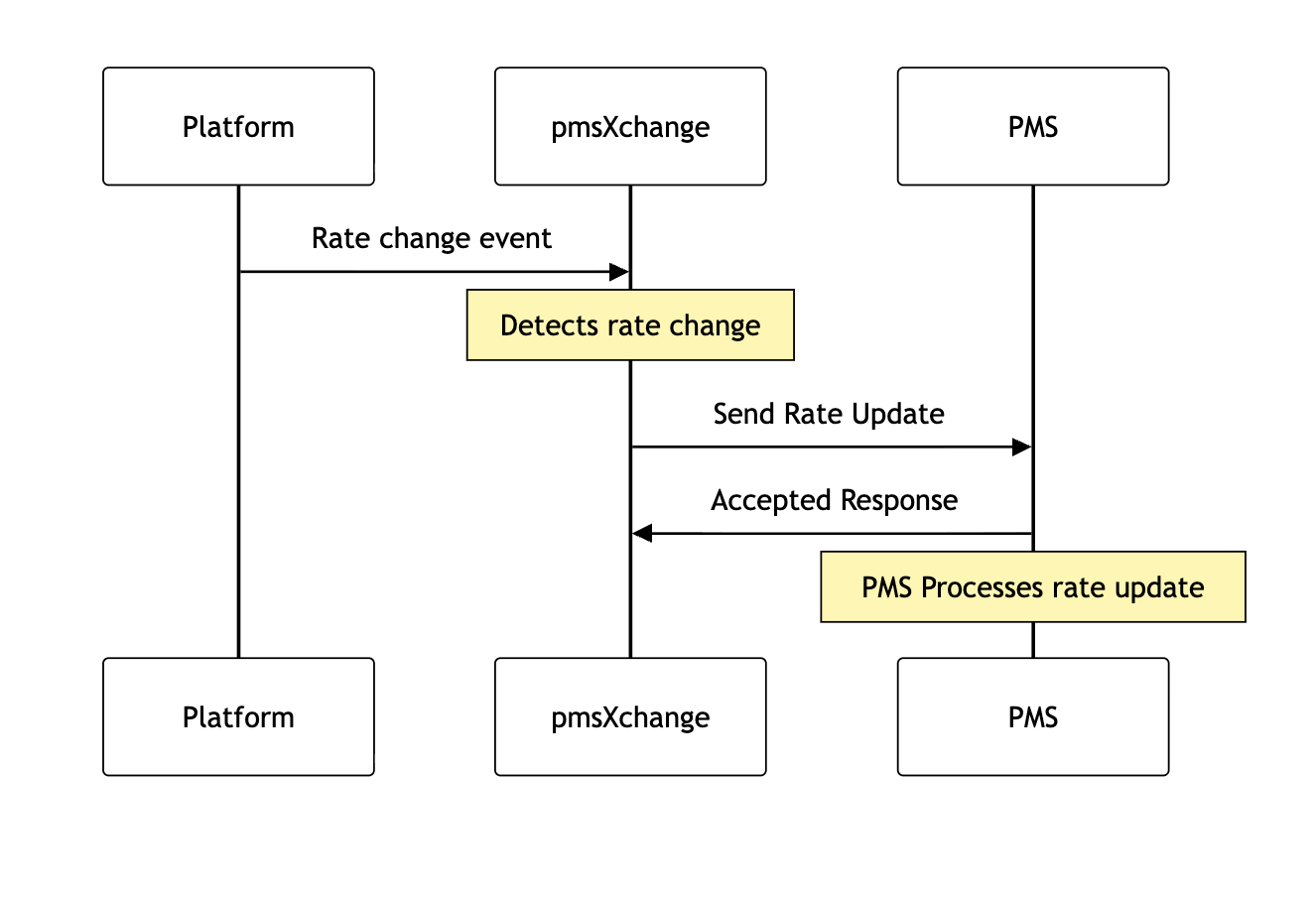
## Message Exchange Flow
The following diagram illustrates the message flow for rate updates:
## Hotel Room Rate Update (Per day rate)
> Endpoint to receive and process hotel room rate rates
```json
{"openapi":"3.0.0","info":{"title":"PMSX Ultra Sync APIs","version":"1.0.3"},"servers":[{"url":"https://pmsx-partner.com","description":"Partner server"}],"security":[{"basicAuth":[]}],"components":{"securitySchemes":{"basicAuth":{"type":"http","scheme":"basic"}},"parameters":{"traceToken":{"name":"X-SM-TRACE-TOKEN","in":"header","description":"The unique identifier of the request (UUID), this traceToken is logged with this request.","required":true,"schema":{"type":"string"}},"hotelCode":{"name":"hotelCode","in":"path","required":true,"description":"Hotel identifier code","schema":{"type":"string"}},"pmsCode":{"name":"pmsCode","in":"path","required":true,"description":"PMSX partner code","schema":{"type":"string"}}},"schemas":{"HotelRateUpdate":{"type":"object","required":["invTypeCode","ratePlanCode","currencyCode","rates"],"properties":{"invTypeCode":{"type":"string","description":"Inventory type code"},"ratePlanCode":{"type":"string","description":"Rate plan code"},"currencyCode":{"type":"string","description":"Three-letter currency code","pattern":"^[A-Z]{3}$"},"rates":{"type":"array","description":"A list per day rate updates for the hotel","items":{"$ref":"#/components/schemas/RateUpdate"}}}},"RateUpdate":{"type":"object","required":["date"],"properties":{"date":{"type":"string","format":"date","description":"Date for which the update applies"},"rate":{"$ref":"#/components/schemas/OccupancyRateAmount"},"extraAdultAmount":{"$ref":"#/components/schemas/RateAmount"},"extraChildAmount":{"$ref":"#/components/schemas/RateAmount"}}},"OccupancyRateAmount":{"type":"object","required":["amountAfterTax","numberOfAdults"],"properties":{"amountAfterTax":{"type":"number","description":"Rate amount after tax"},"amountBeforeTax":{"type":"number","description":"Currently unsupported, rate amount before tax"},"numberOfAdults":{"type":"number","description":"Number of included adults the rate is for"}}},"RateAmount":{"type":"object","required":["amountAfterTax"],"properties":{"amountAfterTax":{"type":"number","description":"Rate amount after tax"},"amountBeforeTax":{"type":"number","description":"Currently unsupported, rate amount before tax"}}},"SuccessResponse":{"type":"object","properties":{"result":{"type":"string","description":"Result"}}},"ErrorResponseList":{"type":"object","properties":{"errors":{"type":"array","description":"List errors","items":{"$ref":"#/components/schemas/ErrorResponse"}}}},"ErrorResponse":{"type":"object","properties":{"code":{"type":"string","description":"Error code"},"message":{"type":"string","description":"Error message"}}}},"headers":{"X-SM-TRACE-TOKEN":{"schema":{"type":"string","description":"The unique identifier of the request (UUID), this traceToken is logged with this request."}},"Time-Stamp":{"schema":{"type":"string","format":"date-time","description":"Response Timestamp."}}},"responses":{"BadRequest":{"description":"Bad request","content":{"application/json":{"schema":{"$ref":"#/components/schemas/ErrorResponseList"}}},"headers":{"X-PMS-TRACE-TOKEN":{"$ref":"#/components/headers/X-SM-TRACE-TOKEN"},"Time-Stamp":{"$ref":"#/components/headers/Time-Stamp"}}},"Unauthorized":{"description":"Unauthorized","content":{"application/json":{"schema":{"$ref":"#/components/schemas/ErrorResponseList"}}},"headers":{"X-PMS-TRACE-TOKEN":{"$ref":"#/components/headers/X-SM-TRACE-TOKEN"},"Time-Stamp":{"$ref":"#/components/headers/Time-Stamp"}}},"AccessDenied":{"description":"Access Denied","content":{"application/json":{"schema":{"$ref":"#/components/schemas/ErrorResponseList"}}},"headers":{"X-PMS-TRACE-TOKEN":{"$ref":"#/components/headers/X-SM-TRACE-TOKEN"},"Time-Stamp":{"$ref":"#/components/headers/Time-Stamp"}}},"NotFound":{"description":"Not Found","content":{"application/json":{"schema":{"$ref":"#/components/schemas/ErrorResponseList"}}},"headers":{"X-PMS-TRACE-TOKEN":{"$ref":"#/components/headers/X-SM-TRACE-TOKEN"},"Time-Stamp":{"$ref":"#/components/headers/Time-Stamp"}}},"TooManyRequests":{"description":"Too Many Requests","headers":{"Retry-After":{"description":"Number of seconds before SM should retry.","required":true,"schema":{"type":"integer","minimum":1}},"X-PMS-TRACE-TOKEN":{"$ref":"#/components/headers/X-SM-TRACE-TOKEN"},"Time-Stamp":{"$ref":"#/components/headers/Time-Stamp"}}},"ServerError":{"description":"Internal server error","content":{"application/json":{"schema":{"$ref":"#/components/schemas/ErrorResponseList"}}},"headers":{"X-PMS-TRACE-TOKEN":{"$ref":"#/components/headers/X-SM-TRACE-TOKEN"},"Time-Stamp":{"$ref":"#/components/headers/Time-Stamp"}}},"ServiceUnavailableError":{"description":"Service Unavailable","content":{"application/json":{"schema":{"$ref":"#/components/schemas/ErrorResponseList"}}},"headers":{"X-PMS-TRACE-TOKEN":{"$ref":"#/components/headers/X-SM-TRACE-TOKEN"},"Time-Stamp":{"$ref":"#/components/headers/Time-Stamp"}}}}},"paths":{"/v1/pmses/{pmsCode}/hotels/{hotelCode}/rates":{"post":{"parameters":[{"$ref":"#/components/parameters/traceToken"},{"$ref":"#/components/parameters/hotelCode"},{"$ref":"#/components/parameters/pmsCode"}],"summary":"Hotel Room Rate Update (Per day rate)","description":"Endpoint to receive and process hotel room rate rates","tags":["Hotel Rate Update"],"requestBody":{"required":true,"content":{"application/json":{"schema":{"$ref":"#/components/schemas/HotelRateUpdate"}}}},"responses":{"200":{"description":"Rates Update received","content":{"application/json":{"schema":{"$ref":"#/components/schemas/SuccessResponse"}}},"headers":{"X-PMS-TRACE-TOKEN":{"$ref":"#/components/headers/X-SM-TRACE-TOKEN"},"Time-Stamp":{"$ref":"#/components/headers/Time-Stamp"}}},"400":{"$ref":"#/components/responses/BadRequest"},"401":{"$ref":"#/components/responses/Unauthorized"},"403":{"$ref":"#/components/responses/AccessDenied"},"404":{"$ref":"#/components/responses/NotFound"},"429":{"$ref":"#/components/responses/TooManyRequests"},"500":{"$ref":"#/components/responses/ServerError"},"503":{"$ref":"#/components/responses/ServiceUnavailableError"}}}}}}
```
## Hotel Room Rate Update (Occupancy based rates)
> Endpoint to receive and process hotel room rate rates
```json
{"openapi":"3.0.0","info":{"title":"PMSX Ultra Sync APIs","version":"1.0.3"},"servers":[{"url":"https://pmsx-partner.com","description":"Partner server"}],"security":[{"basicAuth":[]}],"components":{"securitySchemes":{"basicAuth":{"type":"http","scheme":"basic"}},"parameters":{"traceToken":{"name":"X-SM-TRACE-TOKEN","in":"header","description":"The unique identifier of the request (UUID), this traceToken is logged with this request.","required":true,"schema":{"type":"string"}},"hotelCode":{"name":"hotelCode","in":"path","required":true,"description":"Hotel identifier code","schema":{"type":"string"}},"pmsCode":{"name":"pmsCode","in":"path","required":true,"description":"PMSX partner code","schema":{"type":"string"}}},"schemas":{"HotelOccupancyBasedRateUpdate":{"type":"object","required":["invTypeCode","ratePlanCode","currencyCode","occupancyBasedRates"],"properties":{"invTypeCode":{"type":"string","description":"Inventory type code"},"ratePlanCode":{"type":"string","description":"Rate plan code"},"currencyCode":{"type":"string","description":"Three-letter currency code","pattern":"^[A-Z]{3}$"},"occupancyBasedRates":{"type":"array","description":"A list of occupancy based rate updates for the hotel","items":{"$ref":"#/components/schemas/OccupancyBasedRateUpdate"}}}},"OccupancyBasedRateUpdate":{"type":"object","required":["date"],"properties":{"date":{"type":"string","format":"date","description":"Date for which the update applies"},"occupancyBasedRates":{"type":"array","description":"All occupancy based rates for this date (IE 1-5 pax)","items":{"$ref":"#/components/schemas/OccupancyRateAmount"}},"extraChildAmount":{"$ref":"#/components/schemas/RateAmount"}}},"OccupancyRateAmount":{"type":"object","required":["amountAfterTax","numberOfAdults"],"properties":{"amountAfterTax":{"type":"number","description":"Rate amount after tax"},"amountBeforeTax":{"type":"number","description":"Currently unsupported, rate amount before tax"},"numberOfAdults":{"type":"number","description":"Number of included adults the rate is for"}}},"RateAmount":{"type":"object","required":["amountAfterTax"],"properties":{"amountAfterTax":{"type":"number","description":"Rate amount after tax"},"amountBeforeTax":{"type":"number","description":"Currently unsupported, rate amount before tax"}}},"ErrorResponseList":{"type":"object","properties":{"errors":{"type":"array","description":"List errors","items":{"$ref":"#/components/schemas/ErrorResponse"}}}},"ErrorResponse":{"type":"object","properties":{"code":{"type":"string","description":"Error code"},"message":{"type":"string","description":"Error message"}}}},"headers":{"X-SM-TRACE-TOKEN":{"schema":{"type":"string","description":"The unique identifier of the request (UUID), this traceToken is logged with this request."}},"Time-Stamp":{"schema":{"type":"string","format":"date-time","description":"Response Timestamp."}}},"responses":{"BadRequest":{"description":"Bad request","content":{"application/json":{"schema":{"$ref":"#/components/schemas/ErrorResponseList"}}},"headers":{"X-PMS-TRACE-TOKEN":{"$ref":"#/components/headers/X-SM-TRACE-TOKEN"},"Time-Stamp":{"$ref":"#/components/headers/Time-Stamp"}}},"Unauthorized":{"description":"Unauthorized","content":{"application/json":{"schema":{"$ref":"#/components/schemas/ErrorResponseList"}}},"headers":{"X-PMS-TRACE-TOKEN":{"$ref":"#/components/headers/X-SM-TRACE-TOKEN"},"Time-Stamp":{"$ref":"#/components/headers/Time-Stamp"}}},"AccessDenied":{"description":"Access Denied","content":{"application/json":{"schema":{"$ref":"#/components/schemas/ErrorResponseList"}}},"headers":{"X-PMS-TRACE-TOKEN":{"$ref":"#/components/headers/X-SM-TRACE-TOKEN"},"Time-Stamp":{"$ref":"#/components/headers/Time-Stamp"}}},"NotFound":{"description":"Not Found","content":{"application/json":{"schema":{"$ref":"#/components/schemas/ErrorResponseList"}}},"headers":{"X-PMS-TRACE-TOKEN":{"$ref":"#/components/headers/X-SM-TRACE-TOKEN"},"Time-Stamp":{"$ref":"#/components/headers/Time-Stamp"}}},"TooManyRequests":{"description":"Too Many Requests","headers":{"Retry-After":{"description":"Number of seconds before SM should retry.","required":true,"schema":{"type":"integer","minimum":1}},"X-PMS-TRACE-TOKEN":{"$ref":"#/components/headers/X-SM-TRACE-TOKEN"},"Time-Stamp":{"$ref":"#/components/headers/Time-Stamp"}}},"ServerError":{"description":"Internal server error","content":{"application/json":{"schema":{"$ref":"#/components/schemas/ErrorResponseList"}}},"headers":{"X-PMS-TRACE-TOKEN":{"$ref":"#/components/headers/X-SM-TRACE-TOKEN"},"Time-Stamp":{"$ref":"#/components/headers/Time-Stamp"}}},"ServiceUnavailableError":{"description":"Service Unavailable","content":{"application/json":{"schema":{"$ref":"#/components/schemas/ErrorResponseList"}}},"headers":{"X-PMS-TRACE-TOKEN":{"$ref":"#/components/headers/X-SM-TRACE-TOKEN"},"Time-Stamp":{"$ref":"#/components/headers/Time-Stamp"}}}}},"paths":{"/v1/pmses/{pmsCode}/hotels/{hotelCode}/occupancy-based-rates":{"post":{"parameters":[{"$ref":"#/components/parameters/traceToken"},{"$ref":"#/components/parameters/hotelCode"},{"$ref":"#/components/parameters/pmsCode"}],"summary":"Hotel Room Rate Update (Occupancy based rates)","description":"Endpoint to receive and process hotel room rate rates","tags":["Hotel Rate Update"],"requestBody":{"required":true,"content":{"application/json":{"schema":{"$ref":"#/components/schemas/HotelOccupancyBasedRateUpdate"}}}},"responses":{"200":{"description":"Rates Update received","headers":{"X-PMS-TRACE-TOKEN":{"$ref":"#/components/headers/X-SM-TRACE-TOKEN"},"Time-Stamp":{"$ref":"#/components/headers/Time-Stamp"}}},"400":{"$ref":"#/components/responses/BadRequest"},"401":{"$ref":"#/components/responses/Unauthorized"},"403":{"$ref":"#/components/responses/AccessDenied"},"404":{"$ref":"#/components/responses/NotFound"},"429":{"$ref":"#/components/responses/TooManyRequests"},"500":{"$ref":"#/components/responses/ServerError"},"503":{"$ref":"#/components/responses/ServiceUnavailableError"}}}}}}
```
## The HotelRateUpdate object
```json
{"openapi":"3.0.0","info":{"title":"PMSX Ultra Sync APIs","version":"1.0.3"},"components":{"schemas":{"HotelRateUpdate":{"type":"object","required":["invTypeCode","ratePlanCode","currencyCode","rates"],"properties":{"invTypeCode":{"type":"string","description":"Inventory type code"},"ratePlanCode":{"type":"string","description":"Rate plan code"},"currencyCode":{"type":"string","description":"Three-letter currency code","pattern":"^[A-Z]{3}$"},"rates":{"type":"array","description":"A list per day rate updates for the hotel","items":{"$ref":"#/components/schemas/RateUpdate"}}}},"RateUpdate":{"type":"object","required":["date"],"properties":{"date":{"type":"string","format":"date","description":"Date for which the update applies"},"rate":{"$ref":"#/components/schemas/OccupancyRateAmount"},"extraAdultAmount":{"$ref":"#/components/schemas/RateAmount"},"extraChildAmount":{"$ref":"#/components/schemas/RateAmount"}}},"OccupancyRateAmount":{"type":"object","required":["amountAfterTax","numberOfAdults"],"properties":{"amountAfterTax":{"type":"number","description":"Rate amount after tax"},"amountBeforeTax":{"type":"number","description":"Currently unsupported, rate amount before tax"},"numberOfAdults":{"type":"number","description":"Number of included adults the rate is for"}}},"RateAmount":{"type":"object","required":["amountAfterTax"],"properties":{"amountAfterTax":{"type":"number","description":"Rate amount after tax"},"amountBeforeTax":{"type":"number","description":"Currently unsupported, rate amount before tax"}}}}}}
```
## The RateUpdate object
```json
{"openapi":"3.0.0","info":{"title":"PMSX Ultra Sync APIs","version":"1.0.3"},"components":{"schemas":{"RateUpdate":{"type":"object","required":["date"],"properties":{"date":{"type":"string","format":"date","description":"Date for which the update applies"},"rate":{"$ref":"#/components/schemas/OccupancyRateAmount"},"extraAdultAmount":{"$ref":"#/components/schemas/RateAmount"},"extraChildAmount":{"$ref":"#/components/schemas/RateAmount"}}},"OccupancyRateAmount":{"type":"object","required":["amountAfterTax","numberOfAdults"],"properties":{"amountAfterTax":{"type":"number","description":"Rate amount after tax"},"amountBeforeTax":{"type":"number","description":"Currently unsupported, rate amount before tax"},"numberOfAdults":{"type":"number","description":"Number of included adults the rate is for"}}},"RateAmount":{"type":"object","required":["amountAfterTax"],"properties":{"amountAfterTax":{"type":"number","description":"Rate amount after tax"},"amountBeforeTax":{"type":"number","description":"Currently unsupported, rate amount before tax"}}}}}}
```
## The HotelOccupancyBasedRateUpdate object
```json
{"openapi":"3.0.0","info":{"title":"PMSX Ultra Sync APIs","version":"1.0.3"},"components":{"schemas":{"HotelOccupancyBasedRateUpdate":{"type":"object","required":["invTypeCode","ratePlanCode","currencyCode","occupancyBasedRates"],"properties":{"invTypeCode":{"type":"string","description":"Inventory type code"},"ratePlanCode":{"type":"string","description":"Rate plan code"},"currencyCode":{"type":"string","description":"Three-letter currency code","pattern":"^[A-Z]{3}$"},"occupancyBasedRates":{"type":"array","description":"A list of occupancy based rate updates for the hotel","items":{"$ref":"#/components/schemas/OccupancyBasedRateUpdate"}}}},"OccupancyBasedRateUpdate":{"type":"object","required":["date"],"properties":{"date":{"type":"string","format":"date","description":"Date for which the update applies"},"occupancyBasedRates":{"type":"array","description":"All occupancy based rates for this date (IE 1-5 pax)","items":{"$ref":"#/components/schemas/OccupancyRateAmount"}},"extraChildAmount":{"$ref":"#/components/schemas/RateAmount"}}},"OccupancyRateAmount":{"type":"object","required":["amountAfterTax","numberOfAdults"],"properties":{"amountAfterTax":{"type":"number","description":"Rate amount after tax"},"amountBeforeTax":{"type":"number","description":"Currently unsupported, rate amount before tax"},"numberOfAdults":{"type":"number","description":"Number of included adults the rate is for"}}},"RateAmount":{"type":"object","required":["amountAfterTax"],"properties":{"amountAfterTax":{"type":"number","description":"Rate amount after tax"},"amountBeforeTax":{"type":"number","description":"Currently unsupported, rate amount before tax"}}}}}}
```
## The OccupancyBasedRateUpdate object
```json
{"openapi":"3.0.0","info":{"title":"PMSX Ultra Sync APIs","version":"1.0.3"},"components":{"schemas":{"OccupancyBasedRateUpdate":{"type":"object","required":["date"],"properties":{"date":{"type":"string","format":"date","description":"Date for which the update applies"},"occupancyBasedRates":{"type":"array","description":"All occupancy based rates for this date (IE 1-5 pax)","items":{"$ref":"#/components/schemas/OccupancyRateAmount"}},"extraChildAmount":{"$ref":"#/components/schemas/RateAmount"}}},"OccupancyRateAmount":{"type":"object","required":["amountAfterTax","numberOfAdults"],"properties":{"amountAfterTax":{"type":"number","description":"Rate amount after tax"},"amountBeforeTax":{"type":"number","description":"Currently unsupported, rate amount before tax"},"numberOfAdults":{"type":"number","description":"Number of included adults the rate is for"}}},"RateAmount":{"type":"object","required":["amountAfterTax"],"properties":{"amountAfterTax":{"type":"number","description":"Rate amount after tax"},"amountBeforeTax":{"type":"number","description":"Currently unsupported, rate amount before tax"}}}}}}
```
## The OccupancyRateAmount object
```json
{"openapi":"3.0.0","info":{"title":"PMSX Ultra Sync APIs","version":"1.0.3"},"components":{"schemas":{"OccupancyRateAmount":{"type":"object","required":["amountAfterTax","numberOfAdults"],"properties":{"amountAfterTax":{"type":"number","description":"Rate amount after tax"},"amountBeforeTax":{"type":"number","description":"Currently unsupported, rate amount before tax"},"numberOfAdults":{"type":"number","description":"Number of included adults the rate is for"}}}}}}
```
## The RateAmount object
```json
{"openapi":"3.0.0","info":{"title":"PMSX Ultra Sync APIs","version":"1.0.3"},"components":{"schemas":{"RateAmount":{"type":"object","required":["amountAfterTax"],"properties":{"amountAfterTax":{"type":"number","description":"Rate amount after tax"},"amountBeforeTax":{"type":"number","description":"Currently unsupported, rate amount before tax"}}}}}}
```
## The HotelRestrictionsUpdate object
```json
{"openapi":"3.0.0","info":{"title":"PMSX Ultra Sync APIs","version":"1.0.3"},"components":{"schemas":{"HotelRestrictionsUpdate":{"type":"object","required":["invTypeCode","ratePlanCode","restrictions"],"properties":{"invTypeCode":{"type":"string","description":"Inventory type code"},"ratePlanCode":{"type":"string","description":"Rate plan code"},"restrictions":{"type":"array","description":"List of inventory and rate updates for the hotel","items":{"$ref":"#/components/schemas/RestrictionsUpdate"}}}},"RestrictionsUpdate":{"type":"object","required":["date"],"properties":{"date":{"type":"string","format":"date","description":"Date for which the update applies"},"minLOS":{"type":"number","description":"Minimum length of stay"},"maxLOS":{"type":"number","description":"Maximum length of stay"},"forwardMinStay":{"type":"number","description":"Currently unsupported, minimum length of stay through"},"forwardMaxStay":{"type":"number","description":"Currently unsupported, maximum length of stay through"},"close":{"type":"boolean","description":"Room rate closed"},"closeToArrival":{"type":"boolean","description":"Room rate closed to arrival"},"closeToDeparture":{"type":"boolean","description":"Room rate closed to departure"}}}}}}
```
## The RestrictionsUpdate object
```json
{"openapi":"3.0.0","info":{"title":"PMSX Ultra Sync APIs","version":"1.0.3"},"components":{"schemas":{"RestrictionsUpdate":{"type":"object","required":["date"],"properties":{"date":{"type":"string","format":"date","description":"Date for which the update applies"},"minLOS":{"type":"number","description":"Minimum length of stay"},"maxLOS":{"type":"number","description":"Maximum length of stay"},"forwardMinStay":{"type":"number","description":"Currently unsupported, minimum length of stay through"},"forwardMaxStay":{"type":"number","description":"Currently unsupported, maximum length of stay through"},"close":{"type":"boolean","description":"Room rate closed"},"closeToArrival":{"type":"boolean","description":"Room rate closed to arrival"},"closeToDeparture":{"type":"boolean","description":"Room rate closed to departure"}}}}}}
```
## The ErrorResponse object
```json
{"openapi":"3.0.0","info":{"title":"PMSX Ultra Sync APIs","version":"1.0.3"},"components":{"schemas":{"ErrorResponse":{"type":"object","properties":{"code":{"type":"string","description":"Error code"},"message":{"type":"string","description":"Error message"}}}}}}
```
## The ErrorResponseList object
```json
{"openapi":"3.0.0","info":{"title":"PMSX Ultra Sync APIs","version":"1.0.3"},"components":{"schemas":{"ErrorResponseList":{"type":"object","properties":{"errors":{"type":"array","description":"List errors","items":{"$ref":"#/components/schemas/ErrorResponse"}}}},"ErrorResponse":{"type":"object","properties":{"code":{"type":"string","description":"Error code"},"message":{"type":"string","description":"Error message"}}}}}}
```
## Common Questions
Should I implement both rate endpoints or just one?
You only need to implement one rate endpoint based on your PMS capabilities:
* **Per Day Pricing** (`/rates`): Implement this if your PMS stores a single daily rate with optional extra person charges
* **Occupancy Based Pricing** (`/occupancy-based-rates`): Implement this if your PMS stores separate rates for different occupancy levels (1-5 adults)
SiteMinder automatically converts between formats using the room rate configuration in the Platform, so you'll receive data in the format your PMS supports regardless of how it's configured in the Platform.
Why must I queue updates for offline processing instead of processing them immediately?
Due to the high volume of rate updates, processing them synchronously would block SiteMinder from sending subsequent updates. Your PMS should:
1. Receive the update and return 200 OK immediately
2. Queue the update for asynchronous processing
3. Process the queued updates offline without blocking new incoming requests
This ensures continuous data flow and prevents update backlogs.
How many dates can be included in a single update message?
Each message can contain up to 760 dates for a specific room rate code combination. The actual number depends on the update period configured by the hotel. Each date in the array represents a separate day's rates.
How should I handle the Retry-After header in 429 responses?
When your PMS returns a `429` (Too Many Requests) response, include the `Retry-After` header with the number of seconds SiteMinder should wait before retrying. This allows you to implement rate limiting and back-pressure when your system is under high load.
Example: `Retry-After: 60` tells SiteMinder to wait 60 seconds before sending the next update.
{% hint style="success" icon="sparkles" %}
## Still have questions?
Use the :gitbook-assistant: **Ask** button at the top of the page to chat with our AI assistant — it can help you navigate the guide, understand requirements, and troubleshoot issues.
If you need more support, visit [Integration Support](/integration-support/integration-support.md).
{% endhint %}
---
# Agent Instructions
This documentation is published with GitBook. GitBook is the documentation platform designed so that both humans and AI agents can read, navigate, and reason over technical content effectively. Learn more at gitbook.com.
## Querying This Documentation
If you need additional information that is not directly available in this page, you can query the documentation by asking a question.
Perform an HTTP GET request on the following URL with the `ask` and `goal` query parameters:
```
GET https://developer.siteminder.com/pmsxchange-api/reference/rates/sm-to-pms.md?ask=&goal=
```
`ask` is the immediate question: it should be specific, self-contained, and written in natural language.
`goal` is what the user is ultimately trying to achieve, the reason they need the answer. Sharing it helps GitBook give you a better, more relevant answer. A goal is most helpful when it describes the outcome the user wants rather than restating the question. For example, with `ask=how do I create an API token`, a goal like `automate deployments from our CI pipeline` lets GitBook tailor the answer to that use case.
The response will contain a direct answer to the question and relevant excerpts and sources from the documentation.
Use this mechanism when the answer is not explicitly present in the current page, you need clarification or additional context, or you want to retrieve related documentation sections.